Showing posts with label ADF Task Flow. Show all posts

Thursday, October 3, 2013

ADF TaskFlow Transaction Basics

Transaction is a collection of works either committed or rollback.Create a calling and called task flow to go through some of the transaction basics of task flow

Calling Task flow :


Called Task flow : 


From the behavior section of the called task flow you can see the following options


  •  No Controller transaction is the default option means the called task flow does not participate any transaction management.
  • Always begin New Transaction - Transaction is created when enter to the task flow and completes the task flow when exists the task flow 
  • Always Use Existing transaction - Called task flow participates the existing transaction 
  • User Existing transaction if possible - Participate the existing transaction if available or start a new transaction if not available 
  • restore-save-option


Use restore-save-option =true if you want to discard the changes the end user makes with in a called bounded task flow when the called bounded task flow exits.This option apply only if the bounded task flow is entered by joining the existing transaction and a save point created on entry


No save point on task flow entry if selected prevent the creation of ADF model save point on task flow entry if taskflow participate in 'Always Use existing transaction ' or 'User existing transaction if Possible' . In this case overhead associated with a save point is not created for the transaction.

End the transaction from task flow return activity by selecting the End transaction property to commit or rollback.

Shared Data control behavior and transaction

Share data controls with calling task flow have the options Shared and Isolated

Transaction setting
Shared Data Control scope
Isolated Data Control scope
No controller txn
DataControlFrame shared without open txn
New DataControlFrame is created without an open transaction
Always begin new txn
Begin new if one is not open
Always begin new one
Always Use existing txn
Throws exception if txn is already open
Invalid.The checkbox cannot be deselected
Use Existing txn if possible
Begin a new txn if one is not already open
Always begin a new txn

Saturday, September 14, 2013

ADF Region with parameter

We can execute a bounded task flow with page or jsff fragment using ADF region.ADF region helps in re-usability of the code.ADF region consists of a af:region and the instance object is of oracle.adf.view.rich.model.RegionModel .On first rendering the ADF region content is the first view activity in the bounded task flow.taskflow in the page binding identifies the bounded task flow uses region.mulitaskFlow identifies list of bounded task flow uses region.We can pass values to region using input parameters or using contextual events .parameterMap is an object of java.util.Map identifies what input parameters the task flow passes from task flow to region.Dynamic region is the region what bounded task flow to render on runtime.

Create a bounded task flow with input parameter
region_view1.jsff

<?xml version='1.0' encoding='UTF-8'?>
<jsp:root xmlns:jsp="http://java.sun.com/JSP/Page" version="2.1" xmlns:af="http://xmlns.oracle.com/adf/faces/rich">
  <af:panelGroupLayout id="pgl1">
    <af:outputText value="Input = #{pageFlowScope.inputParameter1}" id="ot1"/>
  </af:panelGroupLayout>

</jsp:root>

Drag and drop the bounded task flow as region 

Edit the page definition of the test page and pass the parameter either through value or EL expression.
Page definition file of the test page.

<?xml version="1.0" encoding="UTF-8" ?>
<pageDefinition xmlns="http://xmlns.oracle.com/adfm/uimodel" version="12.1.2.66.68" id="testRegionPageDef"
                Package="view.pageDefs">
  <parameters/>
  <executables>
    <variableIterator id="variables"/>
    <taskFlow id="btfadfregion1" taskFlowId="/WEB-INF/btf-adf-region.xml#btf-adf-region" activation="deferred"
              xmlns="http://xmlns.oracle.com/adf/controller/binding">
      <parameters>
        <parameter id="inputParameter1" value="Testing"/>
      </parameters>
    </taskFlow>
  </executables>
  <bindings/>
</pageDefinition>

The code for region_view1.jsff 

<?xml version='1.0' encoding='UTF-8'?>
<jsp:root xmlns:jsp="http://java.sun.com/JSP/Page" version="2.1" xmlns:af="http://xmlns.oracle.com/adf/faces/rich">
  <af:panelGroupLayout id="pgl1">
    <af:outputText value="Input = #{pageFlowScope.inputParameter1}" id="ot1"/>
  </af:panelGroupLayout>
</jsp:root>


Run the page and see the input parameter from the region_view1.jsff 

Saturday, September 7, 2013

Return Value For Bounded Task Flow

Bounded task flow can return a value.Task Flow call activity return value by reference.
Create a task flow that is called as below :

Also see the return value specified

Outcome of the task flow return activity is taskFlowReturn1.
return_called_view1.jsff
<?xml version='1.0' encoding='UTF-8'?>
<jsp:root xmlns:jsp="http://java.sun.com/JSP/Page" version="2.1" xmlns:af="http://xmlns.oracle.com/adf/faces/rich">
  <af:panelGroupLayout id="pgl1">
    <af:button text="button 1" id="b1" action="toView2"/>
  </af:panelGroupLayout>

</jsp:root>
Calling Task Flow is as below 


See the return value specified coming over to the task flow call activity.
return_calling_view1.jsff 
<?xml version='1.0' encoding='UTF-8'?>
<jsp:root xmlns:jsp="http://java.sun.com/JSP/Page" version="2.1" xmlns:af="http://xmlns.oracle.com/adf/faces/rich">
  <af:panelGroupLayout id="pgl1">
    <af:button text="button 1" id="b1" action="toTFCall"/>
  </af:panelGroupLayout>
</jsp:root>
return_calling_view2.jsff 
<?xml version='1.0' encoding='UTF-8'?>
<jsp:root xmlns:jsp="http://java.sun.com/JSP/Page" version="2.1" xmlns:af="http://xmlns.oracle.com/adf/faces/rich">
  <af:panelGroupLayout id="pgl1"/>
  <af:outputText value="test- #{pageFlowScope.retVal1}" id="ot1"/>
</jsp:root>
Click on button and finally see the "Hello World" printed.

Code snippet for the calling task flow 
<task-flow-call id="return_called_tf">
      <task-flow-reference>
        <document>/WEB-INF/return_called_tf.xml</document>
        <id>return_called_tf</id>
      </task-flow-reference>
      <return-value id="__1">
        <name>returnValue1</name>
        <value>#{pageFlowScope.retVal1}</value>
      </return-value>
    </task-flow-call>

Code snippet for the called task flow 

  <task-flow-definition id="return_called_tf">
    <default-activity>return_called_view1</default-activity>
    <return-value-definition id="__1">
      <name>returnValue1</name>
      <value>Hello World</value>
      <class>java.lang.String</class>
    </return-value-definition>

Sharing Data Control between Task Flows

A container associated with task flow that contains the data control is called Data control frame. Data control frame is created for each task flow that's entered results in each task flow having it's own unique instance of data control issues .Data control scope is shared or isolated.Shared mean the DataControlFrame is of calling and isolated is having it's own DataControlFrame.Shared wont work if the calling task flow uses URL to invoke called task flow.


<task-flow-definition id="shared_dc_calling">
    <default-activity>shared_dc_view1</default-activity>
    <data-control-scope>
      <shared/>

    </data-control-scope>
......................

If the task flow is in transaction data-control-option effects transaction options.

Transaction  option
Isolated
shared
requires-existing-transaction
Invalid
-          No transaction exception
-          Existing transaction never committed
requires-transaction
Always Begin new transaction
Begin new transaction if one is not already open
new-transaction
Always begin new transaction
Begin new if  one is not open and throw exception if already one there
<default> none
New data control frame is created without an open transaction
Task Flow  uses the calling task flow's transaction for shared data control for any new data controls it creates.task flow does not create or requires a transaction


Monday, September 2, 2013

Passing Parameter to a Bounded Task Flow

Parameters can be defined at the task flow call activity or on the the called task flow.
Create a called bounded task flow with parameters as below
inputParam1 can be defined for the task flow as above.Code for param_called_view1,jsff is as below :

<?xml version='1.0' encoding='UTF-8'?>
<jsp:root xmlns:jsp="http://java.sun.com/JSP/Page" version="2.1" xmlns:af="http://xmlns.oracle.com/adf/faces/rich">
  <af:panelGroupLayout id="pgl1">
    <af:outputText value="param called view1= #{pageFlowScope.param1}" id="ot1"/>
  </af:panelGroupLayout>

</jsp:root>

Create a calling task flow as shown.
Create an input text field in param_calling_view1.jsff which will be passing to the called bounded task flow through the input parameters .Code for param_calling_view1.jsff :
<?xml version='1.0' encoding='UTF-8'?>
<jsp:root xmlns:jsp="http://java.sun.com/JSP/Page" version="2.1" xmlns:af="http://xmlns.oracle.com/adf/faces/rich">
  <af:panelGroupLayout id="pgl1">
    <af:inputText label="Label 1" id="it1" value="#{pageFlowScope.inputValue}"/>
  </af:panelGroupLayout>
  <af:button text="Submit" id="b1" action="toCalled"/>
</jsp:root>

Drag and drop the calling task flow to a page as a region and run the page. Provide some value to input text component and submit. The value will be passed to the called task flow through input parameters . Note the task flow code snippet for calling and called task flows 

Calling Task Flow :
<task-flow-call id="ParamCalledTF">
      <task-flow-reference>
        <document>/WEB-INF/ParamCalledTF.xml</document>
        <id>ParamCalledTF</id>
      </task-flow-reference>
      <input-parameter id="__6">
        <name>inputParameter1</name>
        <value>#{pageFlowScope.inputValue}</value>
      </input-parameter>
    </task-flow-call>

Called Task flow :

<task-flow-definition id="ParamCalledTF">
    <default-activity>param_called_view1</default-activity>
    <input-parameter-definition id="__2">
      <name>inputParameter1</name>
      <value>#{pageFlowScope.param1}</value>
      <class>java.lang.String</class>
    </input-parameter-definition>
    <view id="param_called_view1">
      <page>/param_called_view1.jsff</page>
    </view>
    <use-page-fragments/>
  </task-flow-definition>


Passing Parameter to ADF view activities

Parameters can be passed to a view activity in task flow.Create a bounded task flow as below
Look at the page parameters section on properties of viewParam_view2.jsff.Each parameter has a from value and to value.
Code for viewParam_view1.jsff :
<?xml version='1.0' encoding='UTF-8'?>
<jsp:root xmlns:jsp="http://java.sun.com/JSP/Page" version="2.1" xmlns:af="http://xmlns.oracle.com/adf/faces/rich"
          xmlns:f="http://java.sun.com/jsf/core">
  <af:panelGroupLayout id="pgl1">
    <af:button text="button 1" id="b1" action="toParam2">
      <f:setPropertyActionListener target="#{pageFlowScope.empID}" value="2345"/>
    </af:button>
  </af:panelGroupLayout>

</jsp:root>

empId is set from this page using an property listener action listener.

Code for viewParam_view2.jsff 
<?xml version='1.0' encoding='UTF-8'?>
<jsp:root xmlns:jsp="http://java.sun.com/JSP/Page" version="2.1" xmlns:af="http://xmlns.oracle.com/adf/faces/rich">
  <af:panelGroupLayout id="pgl1">
    <af:outputText value="Test=#{pageFlowScope.empNo}" id="ot1"/>
  </af:panelGroupLayout>
</jsp:root>
Drag and drop the task flow as a region in a page and run the page.Click on the button to set the property and that can be viewed in the view2.


Saturday, August 31, 2013

ADF task Flow Activities with Page Def file

Page definition files define the binding objects that populate data at runtime .This file bind the UI component with the data control .Following are the task flow activities use page definition file to bind data control

  • Method call
  • Router
  • Task Flow call 
  • View 

How to create Page def file?
Right click on each activity and select the option "Create Page Definition".Sample page def file for a task flow call activity
<?xml version="1.0" encoding="UTF-8" ?>
<pageDefinition xmlns="http://xmlns.oracle.com/adfm/uimodel" version="12.1.2.66.68"
                id="tfListeners_tfListeners_tfListenerCalledPageDef" Package="view.pageDefs" SkipValidation="true">
  <parameters/>
  <executables>
    <variableIterator id="variables"/>

  </executables>

ADF Task Flow Return Activity

Return Activity is used when bounded task flow completes and send control flow back to caller.Return activity works only with the bounded task flow.Return task flow's reentry is option is set only if the task flow's reentry-outcome-dependent is set.End transaction option is available for the Return activity for transaction commit and rollback.Also we can set the restore save point option to either true or false.

Create a called task flow as below

return_called_view1.jsff
<?xml version='1.0' encoding='UTF-8'?>
<jsp:root xmlns:jsp="http://java.sun.com/JSP/Page" version="2.1" xmlns:af="http://xmlns.oracle.com/adf/faces/rich">
  <af:panelGroupLayout id="pgl1">
    <af:outputText value="Return Activity Calling TF" id="ot1"/>
    <af:button text="button 1" id="b1" action="testOutCome"/>
  </af:panelGroupLayout>

</jsp:root>

return_called_view1.jsff :
<jsp:root xmlns:jsp="http://java.sun.com/JSP/Page" version="2.1" xmlns:af="http://xmlns.oracle.com/adf/faces/rich">
  <af:panelGroupLayout id="pgl1">
    <af:outputText value="Called Task Flow" id="ot1"/>
    <af:button text="Calling Retun" id="b1" action="toReturn"/>
  </af:panelGroupLayout>
</jsp:root>

Task flow return activity options are as shown below 
The outcome "goToView2" is the control flow case defined in the calling task flow. Also look at the other options like Reentry,End Transaction and Restore Save Point.

Calling Task flow:
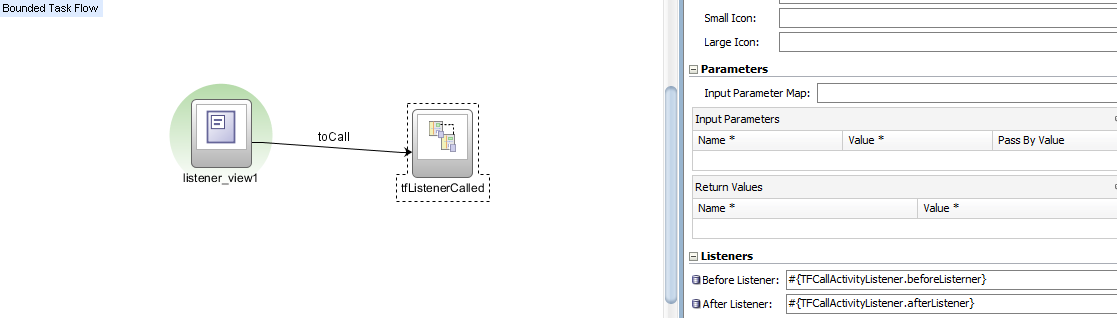
Also set the listeners for the task flow call activity. Below the managed bean for the before and after listener for the task flow call activity.

package test.view;


public class TFCallActivityListeners {
    public TFCallActivityListeners() {
        super();
    }

    public void beforeListerner() {
        System.out.println("Before listener called ");

    }

    public void afterListener() {
        System.out.println("After listener called ");
    }
}

The code for the jspx files in the calling task flow
return_view1.jspx 

<?xml version='1.0' encoding='UTF-8'?>
<jsp:root xmlns:jsp="http://java.sun.com/JSP/Page" version="2.1" xmlns:af="http://xmlns.oracle.com/adf/faces/rich">
  <af:panelGroupLayout id="pgl1">
    <af:outputText value="Return activity" id="ot1"/>
    <af:button text="button 1" id="b1" action="tocall"/>
  </af:panelGroupLayout>
</jsp:root>

return_view2.jspx 

<?xml version='1.0' encoding='UTF-8'?>
<jsp:root xmlns:jsp="http://java.sun.com/JSP/Page" version="2.1" xmlns:af="http://xmlns.oracle.com/adf/faces/rich">
  <af:panelGroupLayout id="pgl1">
    <af:outputText value="To view2" id="ot1"/>
  </af:panelGroupLayout>
</jsp:root>

Drag and drop the calling task flow to a jspx file as a region and run the page. Click through the command buttons to reach the final view in the UI.Check the jdeveloper log to see the after listeners are executed.

ADF Task FLow Call Activity Listeners

Task flow call activity can before and after listeners.These listeners identify the start and end of the bounded task flow.The listener method cannot take parameters.Control flow must return from bounded task flow using control flow rule to execute the after listener.User leaves bounded task flow using browser back button or entering to other URL the after listener won't be called.Need to use task flow finalizers to release resources in this case.
Create a called task flow with task flow return activity
listener_called_view1.jsff:
<?xml version='1.0' encoding='UTF-8'?>
<jsp:root xmlns:jsp="http://java.sun.com/JSP/Page" version="2.1" xmlns:af="http://xmlns.oracle.com/adf/faces/rich">
  <af:panelGroupLayout id="pgl1">
    <af:outputText value="Called Listener" id="ot1"/>
    <af:button text="Return" id="b1" action="toReturn"/>
  </af:panelGroupLayout>

</jsp:root>

Create a calling Task flow 
listener_view1.jsff 

<?xml version='1.0' encoding='UTF-8'?>
<jsp:root xmlns:jsp="http://java.sun.com/JSP/Page" version="2.1" xmlns:af="http://xmlns.oracle.com/adf/faces/rich">
  <af:panelGroupLayout id="pgl1">
    <af:outputText value="TF Listeners" id="ot1"/>
    <af:button text="button 1" id="b1" action="toCall"/>
  </af:panelGroupLayout>
</jsp:root>

Create a managed bean in request scope as below 
package test.view;


public class TFCallActivityListeners {
    public TFCallActivityListeners() {
        super();
    }

    public void beforeListerner() {
        System.out.println("Before listener called ");

    }

    public void afterListener() {
        System.out.println("After listener called ");
    }
}
Drag and drop the calling task flow to the jspx page as a region and run the page. Click on the buttons in the views.Note the listeners are executed and see the messages in the log.

Monday, August 26, 2013

ADF Task Flow Router Activities

Router activity is used to route the activities based on run-time evaluation of EL.Create a bounded task flow as below

Router activity has 
  • Default outcome 
  • Can define cases at any point of development/design 


router_view1.jspx
<?xml version='1.0' encoding='UTF-8'?>
<jsp:root xmlns:jsp="http://java.sun.com/JSP/Page" version="2.1" xmlns:af="http://xmlns.oracle.com/adf/faces/rich">
  <af:panelGroupLayout id="pgl1">
    <af:outputText value="Router view1" id="ot1"/>
    <af:button text="button 1" id="b1" action="toRouter"/>
  </af:panelGroupLayout>

</jsp:root>

Create a managed bean in the pageFlowScope 

package test.view;


public class RouterTest {
 
    public boolean router=false;
    public RouterTest() {
        super();
    }
   
    public void setRouter(boolean router) {
        this.router = router;
    }

    public boolean isRouter() {
        return router;
    }

 
}

The source code changes in bounded task flow xml for router activity
<router id="router1">
      <case id="__6">
        <expression>#{pageFlowScope.Router.router}</expression>
        <outcome>routeView2</outcome>
      </case>
      <default-outcome>routView3</default-outcome>
    </router>

ADF Task Flow URL View Activity

Using URL activity we can redirect view port to any URL addressable resources like

  • Bounded task flow 
  • View activities in the unbounded task flow 
  • External resources 

Create a bounded task flow below

URL activity has 
  • Option to provide URL based on EL 
  • Add optional parameter with name,value and a converter


Create a managed bean in the request scope
package test.view;


public class TestUrl {
 private String goUrl="http://www.google.com";
   
    public void setGoUrl(String goUrl) {
        this.goUrl = goUrl;
    }

    public String getGoUrl() {
        return goUrl;
    }

}
Source code for url_view1.jspx 

<?xml version='1.0' encoding='UTF-8'?>
<jsp:root xmlns:jsp="http://java.sun.com/JSP/Page" version="2.1" xmlns:af="http://xmlns.oracle.com/adf/faces/rich">
  <af:panelGroupLayout id="pgl1">
    <af:button text="button 1" id="b1" action="testURL"/>
  </af:panelGroupLayout>
</jsp:root>
Drag and drop the task flow as a region in the restUrl.jspx .Run the page and click on the button will redirect to the external URL.