Showing posts with label ADF region. Show all posts

Sunday, September 29, 2013

ADF Page to render Unknown Number of Regions


Create two task flows

Task Flow 1:


dyregion_view1.jsff

<?xml version='1.0' encoding='UTF-8'?>
<jsp:root xmlns:jsp="http://java.sun.com/JSP/Page" version="2.1" xmlns:af="http://xmlns.oracle.com/adf/faces/rich">
  <af:panelGroupLayout id="pgl1">
    <af:outputText value="Region 1" id="ot1"/>
  </af:panelGroupLayout>

</jsp:root>

Task Flow 2:
dynamicRegion_view2.jspx

<?xml version='1.0' encoding='UTF-8'?>
<jsp:root xmlns:jsp="http://java.sun.com/JSP/Page" version="2.1" xmlns:af="http://xmlns.oracle.com/adf/faces/rich">
  <af:panelGroupLayout id="pgl1">
    <af:outputText value="Region 2" id="ot1"/>
  </af:panelGroupLayout>

</jsp:root>

Create the managed bean in the pageFlowScope. The code for the managed bean is as below
package view;

import java.util.ArrayList;
import java.util.List;

import oracle.adf.controller.TaskFlowId;
import oracle.adf.controller.binding.TaskFlowBindingAttributes;

public class MultiBean {
  
   private List<TaskFlowBindingAttributes> mattrs= new ArrayList<TaskFlowBindingAttributes>(5);
   public MultiBean() {
      
       TaskFlowBindingAttributes tfAttr= new TaskFlowBindingAttributes();
       tfAttr.setId("region1");
       tfAttr.setTaskFlowId(new TaskFlowId("/WEB-INF/tfDynamicRegion.xml","tfDynamicRegion"));
       mattrs.add(tfAttr);
      
       tfAttr= new TaskFlowBindingAttributes();
       tfAttr.setId("region2");
       tfAttr.setTaskFlowId(new TaskFlowId("/WEB-INF/tfDyanamicRegion1.xml","tfDyanamicRegion1"));
       mattrs.add(tfAttr);
   }
   public List<TaskFlowBindingAttributes> getTaskFlowList() {
       return mattrs;
   }
  

}

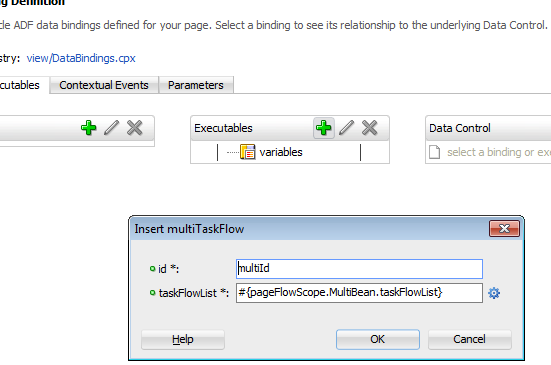
Create a test page and go to the pageDef of the page. Add Executables as below

Click on OK to go the screen below and enter the values as shown.
Create the test page
testMultiFlow.jspx
<?xml version='1.0' encoding='UTF-8'?>
<jsp:root xmlns:jsp="http://java.sun.com/JSP/Page" version="2.1" xmlns:f="http://java.sun.com/jsf/core"
          xmlns:af="http://xmlns.oracle.com/adf/faces/rich">
    <jsp:directive.page contentType="text/html;charset=UTF-8"/>
    <f:view>
        <af:document title="testMultiFlow.jspx" id="d1">
            <af:form id="f1">
                <af:panelGroupLayout id="pgl1">
             
                    <af:panelTabbed id="pt1">
                    <af:forEach items="#{bindings.multiId.taskFlowBindingList}" var="regs">
                   
                        <af:showDetailItem text="#{regs.name}" id="sdi1">
                                <af:panelBox text="#{regs.name}" id="pb2">
                                    <f:facet name="toolbar">
                                     <af:region value="#{regs.regionModel}" id="r2"/>
                                    </f:facet>
                                </af:panelBox>
                            </af:showDetailItem>
                        </af:forEach>
                    </af:panelTabbed>
                </af:panelGroupLayout>
            </af:form>
        </af:document>
    </f:view>

</jsp:root>

Run and see the two region displayed in the showdetailItems of the Tabed layout.

Saturday, September 28, 2013

Navigating outside the region using Parent Action

Create a page Home.jspx as a view activity of adfc-config.xml
Create a bounded task flow using parent action activity
Parent action has the following properties
Parent Outcome - For parent action activity to navigate to the parent view activity
Root Outcome - For parent action activity to navigate to a the root page of the application
Activation_view1.jspx
<?xml version='1.0' encoding='UTF-8'?>
<jsp:root xmlns:jsp="http://java.sun.com/JSP/Page" version="2.1" xmlns:af="http://xmlns.oracle.com/adf/faces/rich">
  <af:panelGroupLayout id="pgl1">
    <af:outputText value="Region jsff" id="ot1"/>
    <af:button text="button 1" id="b1" action="toParent"/>
  </af:panelGroupLayout>

</jsp:root>

Click on the button it will go to the goHome flow defined in adfc-config.

Sunday, September 22, 2013

Refreshing ADF region


  • We can configure region, refreshes to invoke the task flow 
  • ADF region can invoke the task flow if the region is in active state 

There are two type of refresh options
1) Default - Refreshes the region when the page loads and RefreshCondition=true.
2) ifNeeded - Refreshes the region if the value of the flow binding parameters changes.ifNeeded Option is set do not set the refresh condition

Shown above are the activation options for a region

Conditional -Refreshes the region if true
Differed - This is relevant if the the applications uses Faceletes XHTML pages
Immediate - Refresh the region immediately.Region refresh when the page displays

There are 3 ways of refreshing the region

1) Neither refresh or RefreshCondition specified ,Region refreshes the parent page displays
2) ADF region get refreshes when the RefreshConditions EL returns true .Refresh condition is independent of the changing value of binding parameters
3) ifNeeded is set for the Refresh option.Any change of value of binding parameters the refresh take place.ifNeeded selected no RefreshCondition specified.

Lets go through an example demonstrating the refresh condition
Create a task flow
Create a managed bean in pageflowscope of the task flow.

package view;

import java.util.HashMap;
import java.util.Map;

import oracle.adf.view.rich.context.AdfFacesContext;

public class RegionMap {
    private boolean refresh;
    private String time;

    public void setTime(String time) {
        this.time = time;
    }

    public void setRefresh(boolean refresh) {
        this.refresh = refresh;
    }

    public boolean isRefresh() {

        String flag =(String) AdfFacesContext.getCurrentInstance().getPageFlowScope().get("varFlag");
     
        if ("true".equals(flag))
            return true;
        else
            return false;

    }

    public RegionMap() {
        super();
    }

    public Map getMyMap() {
        Map map = new HashMap();
        map.put("test1", "test1");
        map.put("test2", "test2");
        return map;
    }

    public String getTime() {
        long t =System.currentTimeMillis();
        System.out.println(t);
        return "" + t;
    }

    public boolean refreshRegion() {

        AdfFacesContext.getCurrentInstance().getPageFlowScope().put("curTime", System.currentTimeMillis());
        return true;
    }

    public String testMeth() {
        String flag=("true".equals((String) AdfFacesContext.getCurrentInstance().getPageFlowScope().get("varFlag")) ? "false" :
         "true");
        AdfFacesContext.getCurrentInstance().getPageFlowScope().put("varFlag", flag);
        System.out.println("Flag =" + flag);
        // Add event code here...
        return null;
    }
}

 Drag and drop the task flow to testRefreshRegion.jspx as a region and set the refresh condition as shown below

The code for testRefreshRegion.jspx is as below :
<?xml version='1.0' encoding='UTF-8'?>
<jsp:root xmlns:jsp="http://java.sun.com/JSP/Page" version="2.1" xmlns:f="http://java.sun.com/jsf/core"
          xmlns:af="http://xmlns.oracle.com/adf/faces/rich">
    <jsp:directive.page contentType="text/html;charset=UTF-8"/>
    <f:view>
        <af:document title="testRefreshRegion.jspx" id="d1">
            <af:form id="f1">
                <af:region value="#{bindings.regionRefresh1.regionModel}" id="r1"/>
                <af:button text="button 1" id="b1" action="#{pageFlowScope.RegionMap.testMeth}"/>
            </af:form>
        </af:document>
    </f:view>

</jsp:root>

We need to add the managed bean to adfc-config.xml to visible to this page.Run the page. Click on the button based on the pageFlowScope variable = true the region will get refreshed.

ifNeeded and Binding variable change 

 Change the refresh property to ifNeeded as below .


Code for the testRefreshRegion.jspx is as below 

<?xml version='1.0' encoding='UTF-8'?>
<jsp:root xmlns:jsp="http://java.sun.com/JSP/Page" version="2.1" xmlns:f="http://java.sun.com/jsf/core"
          xmlns:af="http://xmlns.oracle.com/adf/faces/rich">
    <jsp:directive.page contentType="text/html;charset=UTF-8"/>
    <f:view>
        <af:document title="testRefreshRegion.jspx" id="d1">
            <af:form id="f1">
                <af:region value="#{bindings.regionRefresh1.regionModel}" id="r1"/>
                <af:button text="button 1" id="b1" action="#{pageFlowScope.RegionMap.testMeth}"/>
                <af:button text="button 2" id="b2" action="#{pageFlowScope.RegionMap.testChange}"/>
            </af:form>
        </af:document>
    </f:view>
Added button 2 here with action method as #{pageFlowScope.RegionMap.testChange}

Add testChange() method to the managed bean.
    public String testChange() {
        AdfFacesContext.getCurrentInstance().getPageFlowScope().put("changeVar", getTime());
       
        // Add event code here...
        return null;
    }


Go to the page Def file of the testRefreshRegionPage.jspx and add parameters there .

<?xml version="1.0" encoding="UTF-8" ?>
<pageDefinition xmlns="http://xmlns.oracle.com/adfm/uimodel" version="12.1.2.66.68" id="testRefreshRegionPageDef"
                Package="view.pageDefs">
  <parameters/>
  <executables>
    <variableIterator id="variables"/>
    <taskFlow id="regionRefresh1" taskFlowId="/WEB-INF/regionRefresh.xml#regionRefresh" activation="deferred"
              xmlns="http://xmlns.oracle.com/adf/controller/binding" Refresh="ifNeeded">
      <parameters>
        <parameter id="parameter" value="#{pageFlowScope.changeVar}"/>
      </parameters>
    </taskFlow>
  </executables>
  <bindings/>
</pageDefinition>

Run the page and click on the 2nd button to see the region refreshes .

Passing Parameters to Region using Parameter Map


  • We can pass parameters to region using parameter property of the region.
  • Parameter Map object is of java.util.Map
  • ADF region or ADF dynamic region can use parameter map 
  • Parameter Map reduces number of parameters under bindings in the page def file of the jspx file where we are dropping the task flow as region.
  • If there are same parameters in the binding and the map the map take the precedence 


Create a bounded task flow
Added two input parameters to the bounded task flow test1 and test2. Drag and drop the task flow to the testParamMapToRegion.jspx. Code for the testParamMapToRegion.jspx is as shown below:
<?xml version='1.0' encoding='UTF-8'?>
<jsp:root xmlns:jsp="http://java.sun.com/JSP/Page" version="2.1" xmlns:f="http://java.sun.com/jsf/core"
          xmlns:af="http://xmlns.oracle.com/adf/faces/rich">
    <jsp:directive.page contentType="text/html;charset=UTF-8"/>
    <f:view>
        <af:document title="testParamMapToRegion.jspx" id="d1">
            <af:form id="f1">
                <af:region value="#{bindings.parameterMaptoRegion1.regionModel}" id="r1"/>
            </af:form>
        </af:document>
    </f:view>

</jsp:root>

Create a managed bean with pageflowScope in adfc-config.xml 

package view;

import java.util.HashMap;
import java.util.Map;

public class RegionMap {
    public RegionMap() {
        super();
    }

    public Map getMyMap() {
        Map map = new HashMap();
       // Parameter value is set here.
        map.put("test1", "test1");
        map.put("test2", "test2");
        return map;
    }
}

The code for the map_view1.jspx is as shown below :

<?xml version='1.0' encoding='UTF-8'?>
<jsp:root xmlns:jsp="http://java.sun.com/JSP/Page" version="2.1" xmlns:af="http://xmlns.oracle.com/adf/faces/rich">
  <af:panelGroupLayout id="pgl1">
    <af:outputText value=" Test =#{pageFlowScope.test1}" id="ot1"/>
     <af:outputText value=" Test =#{pageFlowScope.test2}" id="ot2"/>
  </af:panelGroupLayout>

</jsp:root>

Run the testParamMapToRegion.jspx page and see the pageFlowScope parameters test1 and test2.