Showing posts with label ADF taskflow. Show all posts

Tuesday, August 20, 2013

Run ADF Task Flows

Testing ADF task flow differs depend on the factors whether the taskflow is a bounded or unbounded task flow or task flow using page fragments or jspx pages.Jdeveloper supports break points on task flow activities.Taskflows also support hot re-deployment in Integrated weblogic what we have to do is right click and Make the task flow.

Bounded task flow using page fragments can be tested only by using a region in a jspx page.What we need to do is to drag and drop the bounded task flow into a region or dynamic region in a jspx page.
Bounded task flow with page can be run by right clicking the bounded task flow.

We can run individual pages in the bounded task flow also but the results are not guaranteed.

Bounded task flow with parameter

Create a bounded task flow and create an input parameter as below
Code for bt_param1.jspx
<?xml version='1.0' encoding='UTF-8'?>
<jsp:root xmlns:jsp="http://java.sun.com/JSP/Page" version="2.1" xmlns:f="http://java.sun.com/jsf/core"
          xmlns:af="http://xmlns.oracle.com/adf/faces/rich">
    <jsp:directive.page contentType="text/html;charset=UTF-8"/>
    <f:view>
        <af:document title="bt_param1.jspx" id="d1">
            <af:form id="f1">
                <af:panelGroupLayout id="pgl1">
                    <af:outputText value="#{pageFlowScope.param1}" id="ot1"/>
                </af:panelGroupLayout>
            </af:form>
        </af:document>
    </f:view>

</jsp:root>
Run the bounded task flow you will get a popup dialog for entering the parameter.
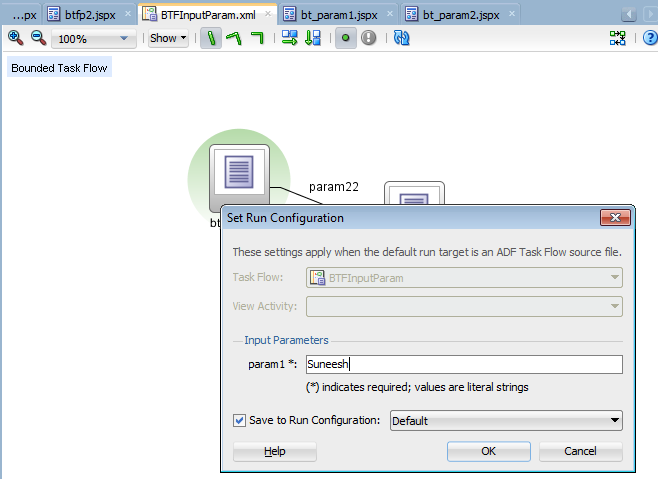
You can see the parameter printed in the bt_param1.jspx.

Running unbounded task flow 
You can select the view activity in a unbounded task flow right click and run 

Adding control flow rules to ADF Taskflow

Control flow rules decides the rule of navigation from one activity to another activity .Following are the activities and control flow elements in ADF task flow

You can drag and drop the activities to the task flow diagram and join them using the control flows.Shown below is a simple task flow with two view activities connected through a control flow case.Pictorial representation of the control flow can be viewed from the structure tab in the left bottom corner. We will go through the xml source of it later in the blog.

If you click on the overview tab of the editor it will display as below.
The jsff pages used for the task flow cf_view1.jsff and cf_view2.jsff
cf_view1:

<?xml version='1.0' encoding='UTF-8'?>
<jsp:root xmlns:jsp="http://java.sun.com/JSP/Page" version="2.1" xmlns:af="http://xmlns.oracle.com/adf/faces/rich">
  <af:panelGroupLayout id="pgl1">
    <af:outputText value="CF View1" id="ot1"/>
    <af:button text="button 1" id="b1" action="tocfView2"/>
  </af:panelGroupLayout>

</jsp:root>
cf_view2.jsff:

<?xml version='1.0' encoding='UTF-8'?>
<jsp:root xmlns:jsp="http://java.sun.com/JSP/Page" version="2.1" xmlns:af="http://xmlns.oracle.com/adf/faces/rich">
  <af:panelGroupLayout id="pgl1">
    <af:outputText value="CF View2" id="ot1"/>
  </af:panelGroupLayout>
</jsp:root>
Created a managed bean in the backing bean scope 


package test.view;


public class TestBean {
    private boolean check=true;

    public void setCheck(boolean check) {
        this.check = check;
    }

    public boolean isCheck() {
        System.out.println(" Check returns "+ check);
        //check=false;
        return check;
    }

    public TestBean() {
    }

    public void test() {
        // Add event code here...
        System.out.println("Test ..................");
    }
    public String  fromActionTest() {
        System.out.println("From fromActionTest.... ");
        String ret="tocfView2";
        return ret;
    }

    public String testingMethBinding() {
        System.out.println("testingMethBinding");
        // Add event code here...
        return "tocfView2";
    }
}
Create a page ctTest.jspx and drag and drop the taskflow as region.In the task flow set the from-action and if property of the control flow as below 

Depending on the check property and return type of testingMethBinding() the flow will go to the next activity. The return string should be the from-outcome to go to the next view activity in this case.Please closely look at the xml source of the task flow.

<?xml version="1.0" encoding="windows-1252" ?>
<adfc-config xmlns="http://xmlns.oracle.com/adf/controller" version="1.2">
  <task-flow-definition id="controlFlow">
    <default-activity>cf_view1</default-activity>
    <managed-bean id="__3">
      <managed-bean-name>TestBean</managed-bean-name>
      <managed-bean-class>test.view.TestBean</managed-bean-class>
      <managed-bean-scope>backingBean</managed-bean-scope>
    </managed-bean>
    <view id="cf_view1">
      <page>/cf_view1.jsff</page>
    </view>
    <view id="cf_view2">
      <page>/cf_view2.jsff</page>
    </view>
    <control-flow-rule id="__1">
      <from-activity-id>cf_view1</from-activity-id>
      <control-flow-case id="__2">
        <from-action>#{backingBeanScope.TestBean.testingMethBinding}</from-action>
        <from-outcome>tocfView2</from-outcome>
        <to-activity-id>cf_view2</to-activity-id>
        <if>#{backingBeanScope.TestBean.check}</if>
      </control-flow-case>
    </control-flow-rule>
    <use-page-fragments/>
  </task-flow-definition>
</adfc-config>

The priority of the evaluation of the control flow rule is as below 
1) from-activity-id,from-action,from-outcome
2) from-activity,from-outcome
3)from-activity

Saturday, August 17, 2013

TaskFlow : Method call

Create a bounded task flow
Details of method call below

Method is #{requestScope.TestBean.test}. Also note the default outcome toTF2. Create the managed bean as below

public class TestBean {
    public TestBean() {
    }

    public void test() {
        // Add event code here...
        System.out.println("Test ..................");
    }
}

The diagram represents boundedTF2 is below
Create a testMain.jspx and drag and drop the boundedTF1 as a region.
Link view1btf1.jsff to view1btf2.jsff using a command button where the action is the control flow toV2. Create a button in view2btf1.jsff which action is toM1.Method will execute and the control will go the boundedTF2 from the default outcome of method call.

Thursday, August 15, 2013

Memory scope for ADF Taskflow

Following are the 6 memory scope for the task flow

application - This scope is applicable to the entire life cycle of application
session - Applicable till session timeout
pageFlowscope - Till the life span of task flow
view - with in the current view activity
request - Span entire request
backingBean- Same duration of requests.Used to store accessors for UI components

Monday, August 12, 2013

ADF Task flow sample and introduction


  • Task flow supports modular approaches in ADF applications 
  • Task Flows are re-usable 
  • There are two type of taskflows bounded and unbounded 
  • Unbounded task flows will have multiple entry points 
  • Bounded task flows 
    • Single entry point multiple exists 
    • Reusable,supports parameters , transaction management ,support re-entry 
    • Render in an ADF region 
    • More than one bounded task flows in a single source file is possible but not recommended 
  • Typical application will have a bounded task flow and multiple unbounded task flows 
  • adfc-config.xml is an unbounded task flow created by default when we create a Fusion web application 
Right click on UI view controller project > From the New gallery select the ADF Task flows option 


Creating a bounded task flow 
Drag and drop view activities 

Create and unbounded task flow by unchecking the "Create as Bounded Task Flow " option
Create a home.jspx file and drag and drop the bounded task flow to it . It will shows the error icon for bounded task flow as below
Remove the unbounded task flow from the editor .Create a btfcall.jspx page and drag and drop the bounded task flow as a region to it .

Drag and drop the btfcall.jspx to the unbounded task flow 

home.jspx 
<?xml version='1.0' encoding='UTF-8'?>
<jsp:root xmlns:jsp="http://java.sun.com/JSP/Page" version="2.1" xmlns:f="http://java.sun.com/jsf/core"
          xmlns:af="http://xmlns.oracle.com/adf/faces/rich">
    <jsp:directive.page contentType="text/html;charset=UTF-8"/>
    <f:view>
        <af:document title="home.jspx" id="d1">
            <af:form id="f1">
                <af:panelGroupLayout id="pgl1">
                    <af:outputText value="Home" id="ot1"/>
                </af:panelGroupLayout>
                <af:button text="Call Bounded Tf jspx" id="b1" action="tobtf"/>
            </af:form>
        </af:document>
    </f:view>
</jsp:root>

view1.jsff :
<?xml version='1.0' encoding='UTF-8'?>
<jsp:root xmlns:jsp="http://java.sun.com/JSP/Page" version="2.1" xmlns:af="http://xmlns.oracle.com/adf/faces/rich">
  <af:panelGroupLayout id="pgl1">
    <af:outputText value="view1" id="ot1"/>
  </af:panelGroupLayout>
  <af:button text="To View 2" id="b1" action="flow12"/>
</jsp:root>

Run the unbounded task flow by right clicking .

Click on the button 


Click on button 
Unbounded TaskFlow
adfc-config.xml is the unbounded task flow created by default
Unbounded tasks flow has bookmarkable view activities
Unbounded taskflow wotnt be called by another taskflow
Unbounded task flow provide multiple point of entry to the application

Bounded Taskflow
Bounded TaskFlow has a single entry point to the application
Bounded taskflow accept input parameters
Bounded taskflow can have return values
Bounded taskflow has its on memory scope called page flow scope
Bounded taskflow can have exception handling activity
Bounded taskflow has well defined boundary
Bounded taskflow are addressable
Re-usability is a major advantage of using bounded taskflow
Shared datacontrol between bounded taskflow is possible
Bounded taskflow provide transaction management
Re-entry option is availabe to enable or disable
On demand loading of metadata
Security can be provided for bounded taskflow through ADF security framework