Testing ADF task flow differs depend on the factors whether the taskflow is a bounded or unbounded task flow or task flow using page fragments or jspx pages.Jdeveloper supports break points on task flow activities.Taskflows also support hot re-deployment in Integrated weblogic what we have to do is right click and Make the task flow.
Bounded task flow using page fragments can be tested only by using a region in a jspx page.What we need to do is to drag and drop the bounded task flow into a region or dynamic region in a jspx page.
Bounded task flow with page can be run by right clicking the bounded task flow.
We can run individual pages in the bounded task flow also but the results are not guaranteed.
Bounded task flow with parameter
Create a bounded task flow and create an input parameter as below
Code for bt_param1.jspx
<?xml
version='1.0' encoding='UTF-8'?>
<jsp:root
xmlns:jsp="http://java.sun.com/JSP/Page" version="2.1"
xmlns:f="http://java.sun.com/jsf/core"
xmlns:af="http://xmlns.oracle.com/adf/faces/rich">
<jsp:directive.page
contentType="text/html;charset=UTF-8"/>
<f:view>
<af:document
title="bt_param1.jspx" id="d1">
<af:form id="f1">
<af:panelGroupLayout
id="pgl1">
<af:outputText
value="#{pageFlowScope.param1}" id="ot1"/>
</af:panelGroupLayout>
</af:form>
</af:document>
</f:view>
</jsp:root>
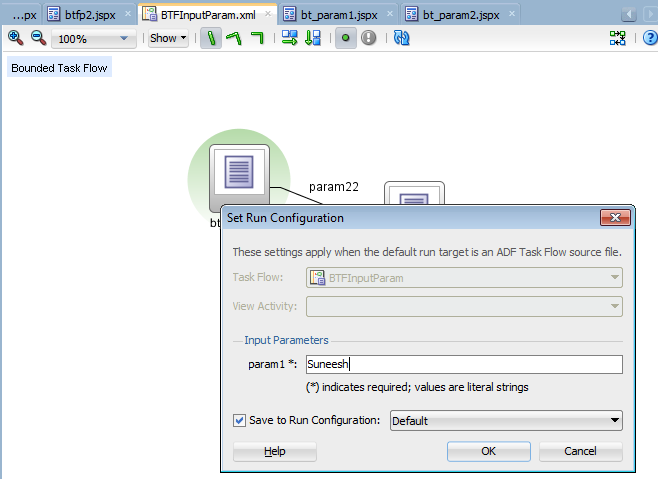
Run the bounded task flow you will get a popup dialog for entering the parameter.
You can see the parameter printed in the bt_param1.jspx.
Running unbounded task flow
You can select the view activity in a unbounded task flow right click and run
 Click on New and create a run configuration.
 Select the task flow for default run target.
 Click on the Task flow and select taskflow from the drop down
 Go to the run menu and run the 'Copy of Default' configuration created
 Save the run configuration and next time just run the required run configuration.