- ADF Controller objects have the following constraints
- JSF as the sole view layer technology
- Depended on Oracle ADF Faces
- ADF controller manages navigation and some extend the state management though JSF and servelet apis are there for state management of its own.
- ADF Model layer is used to implement the application's model layer
- Depend on MDS
- No supported migration path from struts or model 1 architectures.
- Bounded TaskFlow
- Exposed as page flow scope
- Uses ADF Task flow as transaction boundaries
- In order to access page flow scope before and after listener has to executed on restore view phase
- Should perform all navigations through ADF controller flow rules instead of naviagation rules on faces-config.xml
Wednesday, August 21, 2013
ADF Taskflow constraints

Convert JSF Pageflow to ADF taskflow
Create an JSF page flow as below

 Right click and generate ADF taskflow
 You get an option to generate either bounded or unbounded taskflow
 The bounded task flow generated from the above step


Convert Bounded TaskFlow
Converting the bounded task flow with page fragments
 All the jsff page will be converted to jspx pages . There will be an option to keep the existing page fragment also
 The task flow with pages can be converted to the taskflow with page fragments
 Bounded taskflow with page fragments can be converted to unbounded taskflow with pages
 There is an option available to keep the page fragments


Tuesday, August 20, 2013
Extracting a Bounded TaskFlow
Create a bounded task flow as shown in the diagram.Ctrl+Click on the activities to select.Right click and extract task flow.
 Extract the bounded task fow.
 The new task flow extracted will look like
 The original task flow will change like this
 In the original taskflow following changes happened


- Selected activities removed
- New taskflow added
- Control flow cases added as above
Run configuration For ADF UI projects
Go to manage run configuration from jdeveloper Run menu.
 Click on New and create a run configuration.
 Select the task flow for default run target.
 Click on the Task flow and select taskflow from the drop down
 Go to the run menu and run the 'Copy of Default' configuration created
 Save the run configuration and next time just run the required run configuration.


Run ADF Task Flows
Testing ADF task flow differs depend on the factors whether the taskflow is a bounded or unbounded task flow or task flow using page fragments or jspx pages.Jdeveloper supports break points on task flow activities.Taskflows also support hot re-deployment in Integrated weblogic what we have to do is right click and Make the task flow.

Bounded task flow using page fragments can be tested only by using a region in a jspx page.What we need to do is to drag and drop the bounded task flow into a region or dynamic region in a jspx page.
Bounded task flow with page can be run by right clicking the bounded task flow.

We can run individual pages in the bounded task flow also but the results are not guaranteed.
Bounded task flow with parameter
Create a bounded task flow and create an input parameter as below
 Code for bt_param1.jspx


Bounded task flow using page fragments can be tested only by using a region in a jspx page.What we need to do is to drag and drop the bounded task flow into a region or dynamic region in a jspx page.
Bounded task flow with page can be run by right clicking the bounded task flow.

We can run individual pages in the bounded task flow also but the results are not guaranteed.
Bounded task flow with parameter
Create a bounded task flow and create an input parameter as below

<?xml
version='1.0' encoding='UTF-8'?>
<jsp:root
xmlns:jsp="http://java.sun.com/JSP/Page" version="2.1"
xmlns:f="http://java.sun.com/jsf/core"
xmlns:af="http://xmlns.oracle.com/adf/faces/rich">
<jsp:directive.page
contentType="text/html;charset=UTF-8"/>
<f:view>
<af:document
title="bt_param1.jspx" id="d1">
<af:form id="f1">
<af:panelGroupLayout
id="pgl1">
<af:outputText
value="#{pageFlowScope.param1}" id="ot1"/>
</af:panelGroupLayout>
</af:form>
</af:document>
</f:view>
</jsp:root>
Run the bounded task flow you will get a popup dialog for entering the parameter.
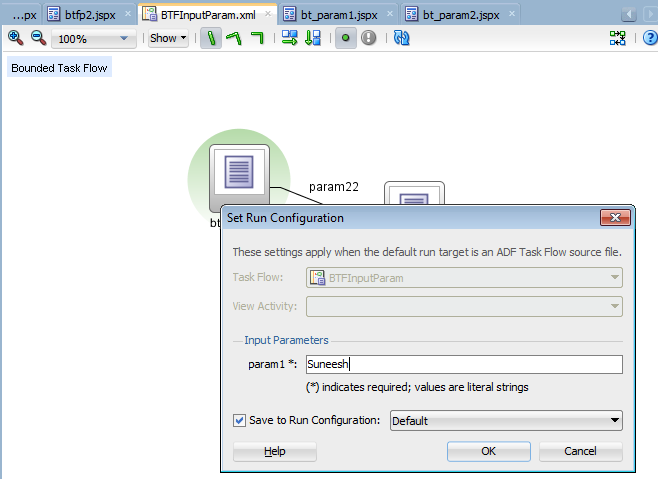
You can see the parameter printed in the bt_param1.jspx.
Running unbounded task flow
You can select the view activity in a unbounded task flow right click and run

Adding control flow rules to ADF Taskflow
Control flow rules decides the rule of navigation from one activity to another activity .Following are the activities and control flow elements in ADF task flow

You can drag and drop the activities to the task flow diagram and join them using the control flows.Shown below is a simple task flow with two view activities connected through a control flow case.Pictorial representation of the control flow can be viewed from the structure tab in the left bottom corner. We will go through the xml source of it later in the blog.
 If you click on the overview tab of the editor it will display as below.
 The jsff pages used for the task flow cf_view1.jsff and cf_view2.jsff
cf_view1:


You can drag and drop the activities to the task flow diagram and join them using the control flows.Shown below is a simple task flow with two view activities connected through a control flow case.Pictorial representation of the control flow can be viewed from the structure tab in the left bottom corner. We will go through the xml source of it later in the blog.


cf_view1:
<?xml
version='1.0' encoding='UTF-8'?>
<jsp:root
xmlns:jsp="http://java.sun.com/JSP/Page" version="2.1"
xmlns:af="http://xmlns.oracle.com/adf/faces/rich">
<af:panelGroupLayout
id="pgl1">
<af:outputText value="CF
View1" id="ot1"/>
<af:button text="button 1"
id="b1" action="tocfView2"/>
</af:panelGroupLayout>
</jsp:root>
cf_view2.jsff:
<?xml
version='1.0' encoding='UTF-8'?>
<jsp:root
xmlns:jsp="http://java.sun.com/JSP/Page" version="2.1"
xmlns:af="http://xmlns.oracle.com/adf/faces/rich">
<af:panelGroupLayout
id="pgl1">
<af:outputText value="CF View2"
id="ot1"/>
</af:panelGroupLayout>
</jsp:root>
Created a managed bean in the backing bean scope

package test.view;
public class TestBean {
private boolean check=true;
public void setCheck(boolean check) {
this.check = check;
}
public boolean isCheck() {
System.out.println(" Check returns "+ check);
//check=false;
return check;
}
public TestBean() {
}
public void test() {
// Add event code here...
System.out.println("Test ..................");
}
public String fromActionTest() {
System.out.println("From fromActionTest.... ");
String ret="tocfView2";
return ret;
}
public String testingMethBinding() {
System.out.println("testingMethBinding");
// Add event code here...
return "tocfView2";
}
}
Create a page ctTest.jspx and drag and drop the taskflow as region.In the task flow set the from-action and if property of the control flow as below

Depending on the check property and return type of testingMethBinding() the flow will go to the next activity. The return string should be the from-outcome to go to the next view activity in this case.Please closely look at the xml source of the task flow.
<?xml
version="1.0" encoding="windows-1252" ?>
<adfc-config
xmlns="http://xmlns.oracle.com/adf/controller"
version="1.2">
<task-flow-definition
id="controlFlow">
<default-activity>cf_view1</default-activity>
<managed-bean id="__3">
<managed-bean-name>TestBean</managed-bean-name>
<managed-bean-class>test.view.TestBean</managed-bean-class>
<managed-bean-scope>backingBean</managed-bean-scope>
</managed-bean>
<view id="cf_view1">
<page>/cf_view1.jsff</page>
</view>
<view id="cf_view2">
<page>/cf_view2.jsff</page>
</view>
<control-flow-rule
id="__1">
<from-activity-id>cf_view1</from-activity-id>
<control-flow-case
id="__2">
<from-action>#{backingBeanScope.TestBean.testingMethBinding}</from-action>
<from-outcome>tocfView2</from-outcome>
<to-activity-id>cf_view2</to-activity-id>
<if>#{backingBeanScope.TestBean.check}</if>
</control-flow-case>
</control-flow-rule>
<use-page-fragments/>
</task-flow-definition>
</adfc-config>
The priority of the evaluation of the control flow rule is as below
1) from-activity-id,from-action,from-outcome
2) from-activity,from-outcome
3)from-activity
Subscribe to:
Posts (Atom)